Markmap: Convert Markdown to Interactive Mindmaps
Markmap is a simple yet powerful tool that transforms markdown files into interactive, visual mindmaps. It eliminates the need for complex mindmapping software—just write markdown, and Markmap handles the rest. The result is a beautiful, interactive HTML visualization...
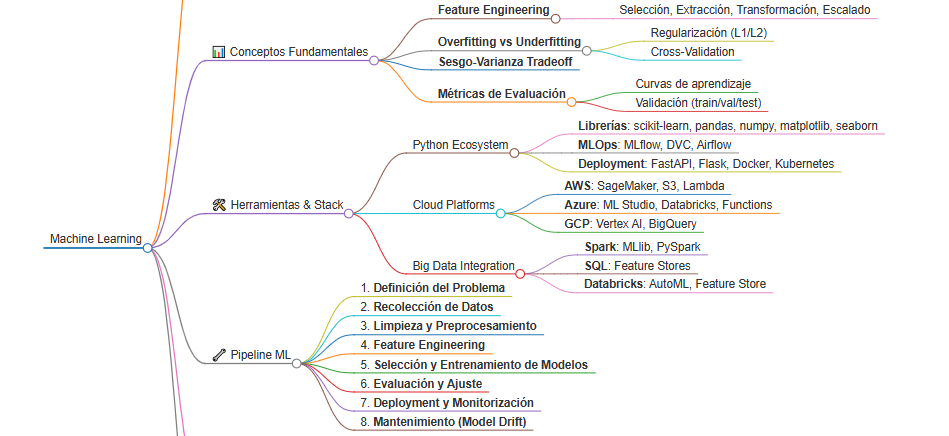
Markmap is a simple yet powerful tool that transforms markdown files into interactive, visual mindmaps. It eliminates the need for complex mindmapping software—just write markdown, and Markmap handles the rest. The result is a beautiful, interactive HTML visualization that you can share or embed.
-
Simple: Write plain markdown, no special syntax needed
-
Fast: Convert files instantly
-
Interactive: Navigate, pan, zoom, and collapse/expand branches
-
Shareable: Export as HTML for easy distribution
-
Lightweight: Minimal dependencies, works in the browser
Install Markmap globally using npm:
npm install -g markmap-cli- Write your markdown file with a hierarchical structure using heading levels:
# Main Topic## Subtopic 1### Detail 1.1### Detail 1.2## Subtopic 2### Detail 2.1- Convert to HTML using the command line:
markmap your-file.md -o your-file.html- Open the HTML file in your browser to view the interactive mindmap
-
Use # for the root/central node
-
Use ## for main branches
-
Use ###, ####, etc. for nested levels
-
Markdown formatting works: bold, italic, code, links, etc.
-
Bullet points and numbered lists are also supported
Input markdown (topics.md):
# Machine Learning## Supervised Learning### Classification### Regression## Unsupervised Learning### Clustering### Dimensionality Reduction## Deep Learning### Neural Networks### CNNs and RNNsCommand:
markmap topics.md -o topics.htmlResult: An interactive mindmap visualization opening in your browser with expandable/collapsible nodes, zoom, and pan capabilities.
-
Keyboard shortcuts: Most browsers support standard zoom and navigation
-
Mouse interactions: Click on nodes to collapse/expand, scroll to zoom
-
Rich content: Include links, code blocks, and formatting in your markdown
-
Batch conversion: Markmap can process multiple files
-
Planning and brainstorming sessions
-
Project structure visualization
-
Study notes and concept mapping
-
Documentation organization
-
Process flowcharts
Markmap is perfect for when you want mindmap functionality without the overhead of specialized tools. Pure markdown simplicity with powerful visualization.
For more details, check the official documentation at https://markmap.js.org/docs/markmap